Make PowerPoint presentations more attractive in one click

VisualBee is a plug-in for Microsoft PowerPoint that automatically enhances PowerPoint presentations with new styles and a wide variety of images.

Using this plug-in is very easy. After installing it and registering as user – required to start using it – simply launch PowerPoint and you’ll see a new tab on the ribbon interface, containing all the VisualBee tools and options.

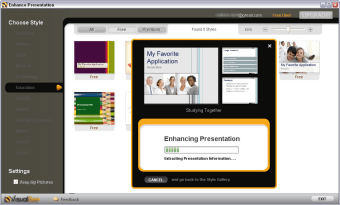
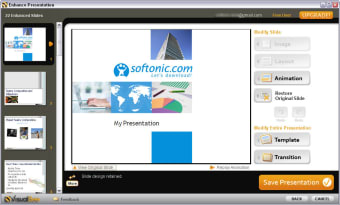
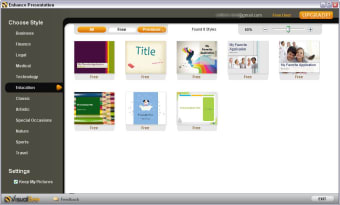
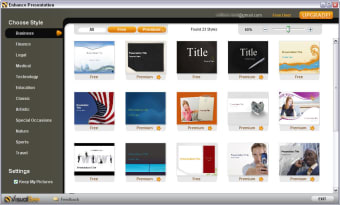
When you press the Enhance presentation button VisualBee opens up on a separate window and lets you choose a new style for your presentation. There are dozens of them, all conveniently organized in categories. Once the style is applied, you can go slide by slide, customizing small details such as animation and transition effects. VisualBee also features an Image gallery to give your presentation the final touch.

VisualBee comes in handy for those who struggle with graphics and images every time they have to create a presentation. On the downside, the so-called enhancement doesn’t always work and the result may be worse than the original slides.

VisualBee is a plug-in for Microsoft PowerPoint that helps you create better presentations by providing you with extra styles and images.


  • Pros

    • Nicely integrated in Microsoft PowerPoint
    • Lots of styles and images included
    • You can customize slides individually
  • Cons

    • Requires user registration (even the Free version)
    • Results are not always satisfying
 0/4

App specs

  • License

    Free

  • Version

    3.7
  • Latest update

  • Platform

    Windows

  • OS

    Windows 7

  • Language

    English

  • Downloads

    80.2K

    Last month's downloads

    • 2
  • Size

    415.44 KB

  • Developer

    • VisualBee

Program available in other languages


Icon of program: VisualBee

VisualBee for PC

  • Free
  • 3
    60
  • 80.2K
  • V3.7

User reviews about VisualBee

Have you tried VisualBee? Be the first to leave your opinion!

Add review

You may also like

Alternatives to VisualBee

Explore Apps

Latest articles

Laws concerning the use of this software vary from country to country. We do not encourage or condone the use of this program if it is in violation of these laws.
Softonic

Is VisualBee safe?

64/100

Score result: Warning

This file has been flagged as potentially harmful or containing unwanted bundled software. Please proceed with caution.

  • Virus free
  • Spyware free
  • Malware free
  • Verified by Security Partners

    VirusTotal logo

Scan Info

Last scan
Thursday, December 7, 2023
Scan provider
VirusTotal · Full report

File Integrity

File
VisualBeeInstall.exe
SHA256
be2230258037f1ac8d1d9c6f64f414dab0921fa7ff472417e5fac41f309f410b
SHA1
58e3d25ef6b8d6f431f53a5d74f4ce789e8fd91c

Softonic security notice

This software has been thoroughly scanned by our advanced security systems and verified by industry-leading partners. However, one or more antivirus engines have flagged this software with potential risks. While these detections may be false positives, we recommend caution when downloading and installing. Some programs may include unwanted software or behaviors that could affect your device. False positives can occur when safe software is mistakenly flagged as harmful due to overly cautious detection rules or algorithms in antivirus tools. This means the program may still be safe to use, but we advise reviewing the details before proceeding.